
Play on a Mac
The Mac version is on its way. Until then, a Mac with Apple silicon can run the Windows version inside UTM, a free app that runs Windows in a window.
Supported launch monitors
| Launch monitors | Connects through |
|---|---|
| Wi-Fi |
| rēlā app, set to GSPro |
| Uneekor Launcher app, set to GSPro, with Uneekor's Third-party Connector license (experimental) |
What you need
- A Mac with Apple silicon, on macOS 14 or newer.
- About 50 GB of free disk space.
Install UTM
Download UTM 5.0.8 or newer, open the file and drag UTM into Applications.
Download UTMMac App Store versionUTM's website
UTM's fastest graphics need Rosetta. If your Mac has never installed it, open Terminal and run:
softwareupdate --install-rosettaDownload Windows 11 for Arm
Get CrystalFetch from the Mac App Store, the free downloader UTM recommends. Choose Windows 11 for Apple silicon and it saves an
.isofile. You can also download the file from Microsoft's Windows 11 Arm64 page.Create the Windows machine
- Open UTM, press +, choose Virtualize, then Windows.
- Set Memory to 8192 MiB.
- Leave Install Windows 10 or higher and Install drivers and SPICE tools ticked.
- Beside Boot ISO Image, press Browse and pick the
.isofile you downloaded. - Leave Storage at 64 GiB, press Continue through to the summary, then Save.
Check the display and sound settings
Right-click the new machine in UTM's list and choose Edit.
- Under Display, set Emulated Display Card to virtio-ramfb-gl (GPU Supported) and turn on Retina Mode.
- Under Sound, set Emulated Audio Card to Intel HD Audio Controller (ich6) (intel-hda).
Press Save.
Install Windows
Start the machine and press a key when it asks, so the Windows installer starts. Follow Windows' setup to the desktop. UTM's Windows 11 guide covers each screen and what to do if setup stalls.
Turn on 3D graphics
When Windows first reaches the desktop, the UTM Guest Tools Installer opens. On its Graphics Acceleration page, tick Enable experimental 3D acceleration, press Install, then restart Windows.
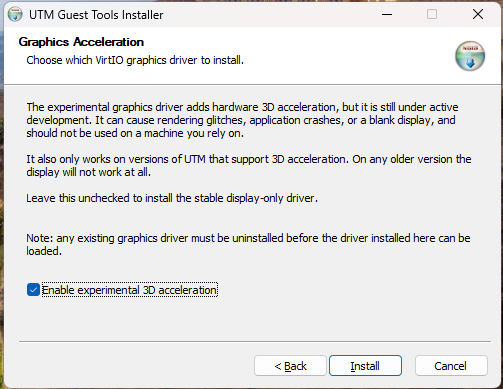
Tick the box before pressing Install. If the installer did not open, press the CD button in the machine's toolbar, choose Install Windows Guest Tools..., then open the CD in File Explorer and run
utm-guest-tools.exe.To check it worked, right-click the Start button, open Device Manager and look under Display adapters for Red Hat VirtIO GPU 3D controller.
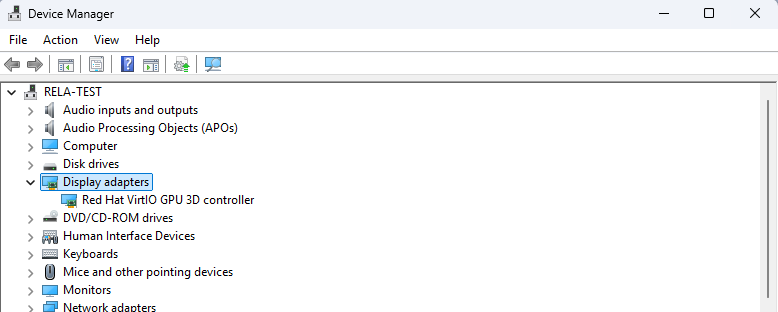
The 3D controller means the game can use your Mac's graphics chip. If it says Red Hat VirtIO GPU DOD controller instead, the plain display driver is installed. Run
Uninstall-VirtioGpu.cmdfrom the Guest Tools CD, which restarts Windows, then runutm-guest-tools.exeagain and tick the box. UTM's Windows graphics page has the details.Set the screen resolution
In Windows, open Settings, then System, then Display, and choose a Display resolution. 3840 × 2160 is the sharpest. 1920 × 1080 runs faster.
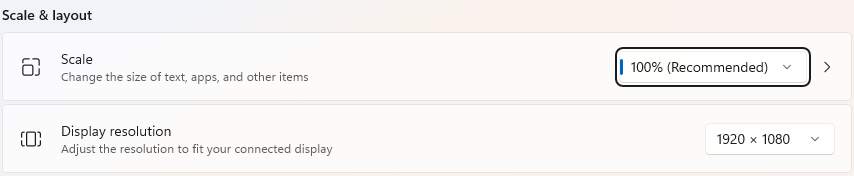
A low resolution is what makes the picture look blurry. Install Super Sim Golf
- In Windows, open Microsoft Edge and go to supersimgolf.com/download/.
- Press Download for Windows.
- Open the downloaded installer and follow the setup wizard. Then open Super Sim Golf from the Windows Start menu. If you downloaded a ZIP, choose Extract All and open
Super Sim Golf.exein the extracted folder.
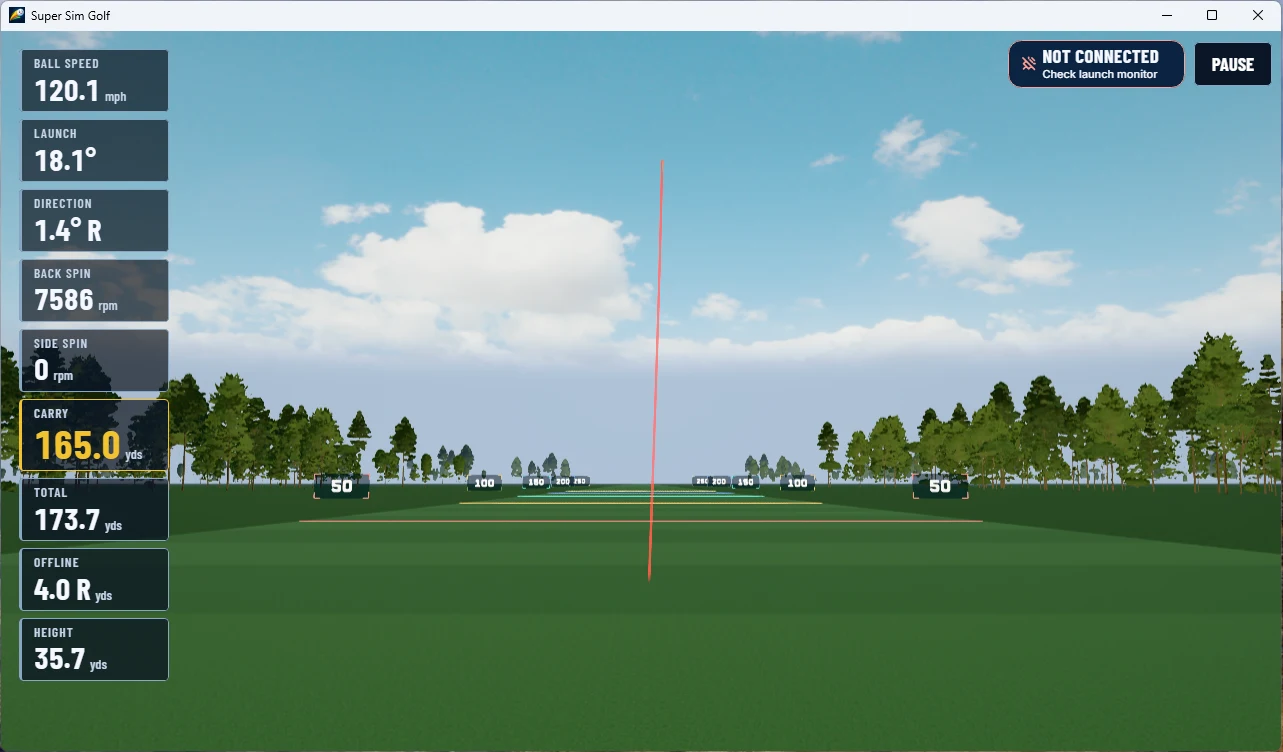
The driving range, running in Windows on a Mac.
Connect your launch monitor
The launch monitor list says how each one connects.
- Wi-Fi
- So Windows joins the same network as the launch monitor, edit the machine in UTM and under Network change Network Mode from Shared Network to Bridged (Advanced).
- For NOVA by Open Launch, turn on the monitor and connect it to the same network as your Mac. In the game in Windows, press Connect and choose Open Launch. The game finds your NOVA automatically.
- Through rēlā
- Install rēlā in Windows, beside the game. In the game, press Connect and choose Connect through rēlā. The game then shows what to set in rēlā.
- Through Uneekor Launcher (experimental)
- Install Uneekor Launcher in Windows, beside the game, and sign in to your Uneekor account. In the game, press Connect and choose Uneekor. The game then shows what to set in Uneekor Launcher.
- If your launch monitor plugs into the computer with a network cable, plug it into your Mac's Ethernet port or a USB Ethernet adapter. Edit the machine in UTM, press New…, choose Network, then set Network Mode to Bridged (Advanced) and Bridged Interface to that port. Leave the first network on Shared Network so Windows stays online.
- Bluetooth
- Garmin Approach R10, Square Golf Omni do not connect this way yet: Windows inside UTM cannot use your Mac's Bluetooth.
If something looks wrong
- The picture is blurry
- Raise the display resolution in Windows, and check Retina Mode is on in UTM.
- The game is slow or will not load a round
- Windows is drawing without your Mac's graphics chip. Check Device Manager shows the 3D controller.
- There is no sound
- Edit the machine in UTM and check an audio card is set under Sound.
- The screen stays black after installing the Guest Tools
- Restart the machine from UTM's toolbar.